Monday, August 22, 2011

iPhone4 : 30th Sept Announce, 7th Oct Launch

Much awaited iPhone5. Probably will look like this... 

As per confirmed by the accessory case.


And bigger screen 


Pictures thanks to respective Site Owners

Wednesday, July 6, 2011

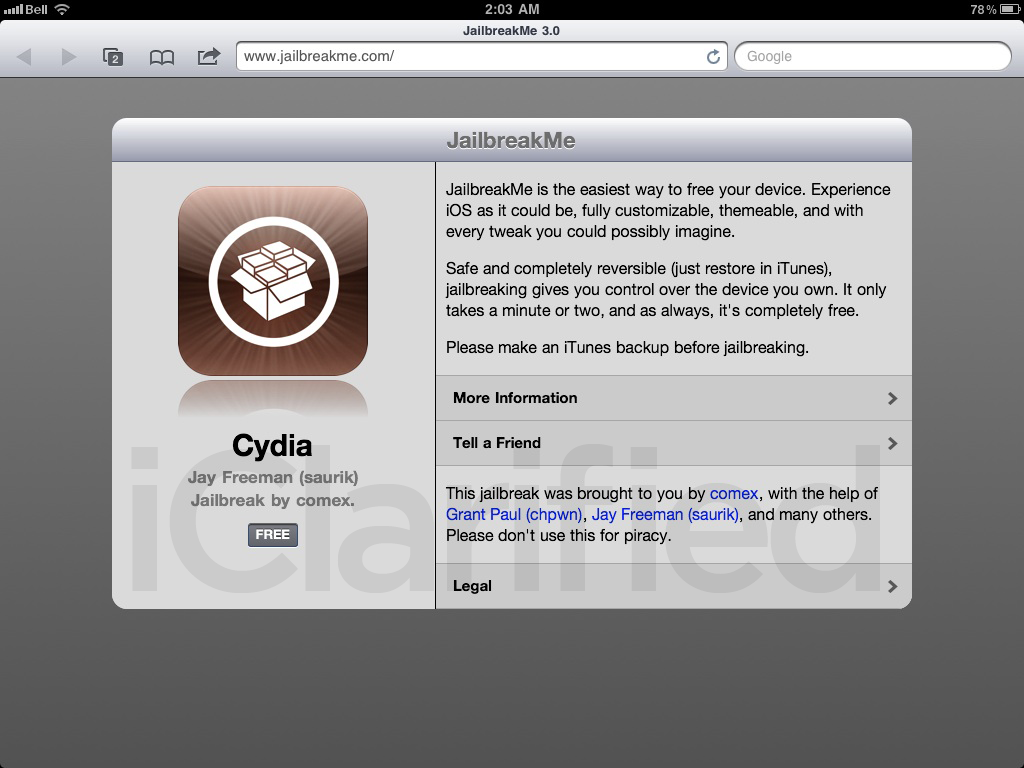
JailbreakMe3.0 is Back

Working on any iOS devices on iOS 4.3.3


Just head on over to JailBreakMe.com

Here is the video on the very simple steps : http://www.youtube.com/watch?feature=player_embedded&v=GNMoFGpM1kM

Sunday, June 19, 2011

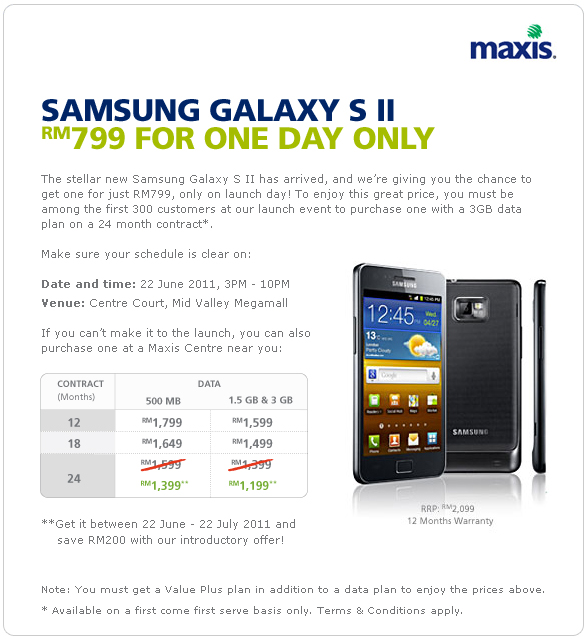
Galaxy S II for RM799 at the Maxis Launch Event

Got an email from Maxis. RM 799 for Galaxy S II... Only for one day.. hmm.. At first I thought, OK!! I must go que up... However, the catch is, a new 3G data plan have to be registered. And this got me thinking... 

Which means to get this, you have to subscribe monthly :
- Value Plus 50 (Minimum) - RM 50 
- 3GB data plan (for 24 months) - RM 88 

Am now using Maxis value plus 50 + 500Mb plan for my Galaxy S package last year. (RM 50 + RM 58 - RM 10 rebate = RM 98 monthly)

To qualify for a promotion priced SGSII, I need to fork out additional RM 40 per month. RM 40 x 24 = RM 960. Which means the total cost to own this is RM 1,759 if I que up at the launch and "HOPE" to be one of the first 300 customer. 

I might as well get RM 1,799 for the phone and maintain my current package... I only pay RM 40 extra one time...  heheheh.. No Que, No hassle... Furthermore, I don't need additional data up to 3GB on my phone network, I'd already say YES to a much faster option for that. HAHAHA!

Friday, June 10, 2011

Apple Keyboard pairing with iPhone/iPad/iPad2

Punching away on the iPad on screen keyboard proves to be smooth and effortless, however those with shiny pink manicured nails or those using lots of symbols and special characters will find the keyboard quite limited. Not to mention the keyboard takes up nearly half the screen.

What you need? If you own an iMac, just use the same Keyboard. If you got one for your birthday, Happy Birthday! Else, you can easily get it from any authorized apple store.

Pairing the Bluetooth Wireless Mac Keyboard is super easy

Step 1: Turn on the keyboard.
- If it's new, go to step 2
- If you paired this before with iMac or other device, remove the battery, reinsert it and go to step 2

Step 2: In the iPad or any iOS, Go to > General > Bluetooth and turn it ON.
You will see the Apple Wireless Keyboard as "Not Paired"


Step 3: Tap on the Apple Wireless Keyboard to start the pairing process. a 4 digit PIN code will be prompted. Just key in the PIN code on the keyboard and press Enter.


DONE! You will see the Apple Wireless Keyboard labelled as Connected. 


Open up your favorite app and start typing. It is a whole new experience as the on screen keyboard is no longer popping up blocking screen real estates....


ENJOY!!!

Wednesday, June 1, 2011

Samsung's Solar Powered Notebook/Netbook!

Since May 11th, Twitters and Blogs have been flooded with news about Samsung's Solar Powered Notebooks due to Samsung's unveiling of a netbook (Samsung NC215) at the Africa Regional Forum in Nairobi.

The netbook is supposed to be completely usable off the grid and just needs the sun to charge its batteries. Imagine using this notebook in remote places, while traveling and even around town without the extra weight of adapters like the other netbooks.

Thanks to Samsung's notebook brand manager Mr KM Chew for allowing me to take a few pictures. More about the capabilities are still strictly under lock and key. 


The netbook. Easily spotted with the large solar panel covering the whole front cover.

The top cover/screen is not made any more thicker than normal netbooks.

On the right, the usual notebook lock, VGA out, USB ports and Audio ports

Netbook sized keyboard, island keys, nice layout

On the left, power for quick charging, RJ45 port and USB


You saw it first on JL's Gadget Blog!

Wednesday, May 25, 2011

Yes Reload Cards

Yes came up with yet another new and easier way to reload. Reload Cards! They are in the form of scratch cards which are no stranger to most prepaid users in Malaysia. I decided to drop by my nearest Yes Retail Store and get one. It's available in RM 100, RM 50, RM 30 an RM 10. (Nice collectible colours too!)


The steps are simple !

STEP 1 : Get a Yes Reload Card
- scratch to reveal Activation Code


STEP 2 : Login to www.yes.my/reload 
- Enter Yes ID and Activation Code


STEP 3 : Say YOU ARE WELCOME
- When you see the THANK YOU page... You are DONE!


Sunday, May 15, 2011

Updates:iPad2 jailbreak 4.3, 4.3.1, 4.3.2, 4.3.3 untethered or tethered.

As of today, there are NO jailbreak out there for iPad2 4.3 /4.3.x yet. Many people out there mixed up the 4.3.x jailbreak for iPad, iPhone4 thinking that it will work the same with iPad2. However... it is almost there... Let's see what are the updates.


May 15 : i0n1c has mentioned via his Twitter that he will no longer give exploits for free. (i0n1c, the guy behind iOS 4.3.3 / 4.3.2 / 4.3.1 untethered jailbreak flavor for all iOS devices except iPad 2)


May : Comex is expected to release a userland jailbreak, JailbreakMe 3.0 may be, to jailbreak iPad 2.


April 28 : iPad 2 jailbreak with A5-2Lib02 is fake.


April 4 : Redsn0w Untethered Jailbreak Release Addresses iOS 4.3.1, But iPad 2 Owners Must Wait


April : no word from the Chronic Dev Team on whether Greenpois0n will jailbreak iOS 4.3.2 or the current 4.3.1. So, to be on the safe side, stay with iOS 4.3 firmware.


April : http://www.ultrasn0w.ca/2011/04/jailbreak-ipad-2-432-almost-done.html Tweeted by @veeence


March : comex successfully developed using JailbreakMe2.0 in the first week of the iPad2 release but was mysteriously fixed by Apple in 4.3.1. Comex will not release the jailbreak for 4.3 yet as there were some legal implication. 


Sources : 
http://greenpois0n.com 
http://www.ultrasn0w.ca
http://www.limera1n.cc
http://twitter.com/#!/sn0wbreezenews